


Hot App Reviews - Best Free Apps Download & Guides

Install Instagram at No-Cost

WhatsApp Setup

Download and Install YouTube

Keep Zoom Up-to-Date
 4.7
4.7
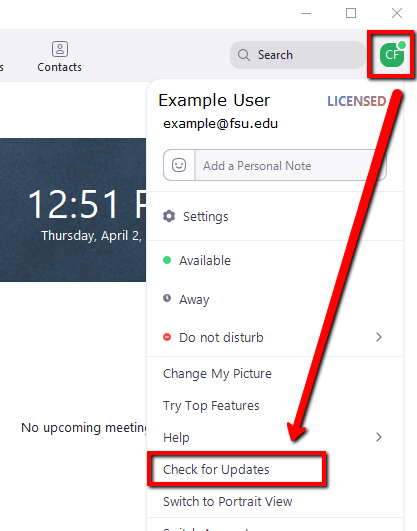
Regular updates can enhance your Zoom experience and help you avoid potential issues. Here’s a guide on how and when to update Zoom.1. Check for Updates Manually:- Open Zoom desktop client.- Click on your profile picture in the top right corner.- Select “Check for Updates.” If an update is available, follow prompts to download it.2. Automatic Updates: - In settings under “General,” check “Automatically keep my client up to date.” This ensures that updates are applied without manual intervention.3. Mobile Updates: - For mobile users, visit Google Play Store (Android) or App Store (iOS). Search for “Zoom” and tap “Update” if available.4. When to Update:- Regularly check for updates at least once a month or whenever notified by the application about new updates available.- Update before important meetings or events where new features might enhance functionality or security.

Make and Manage Payment in Play Store
4.8
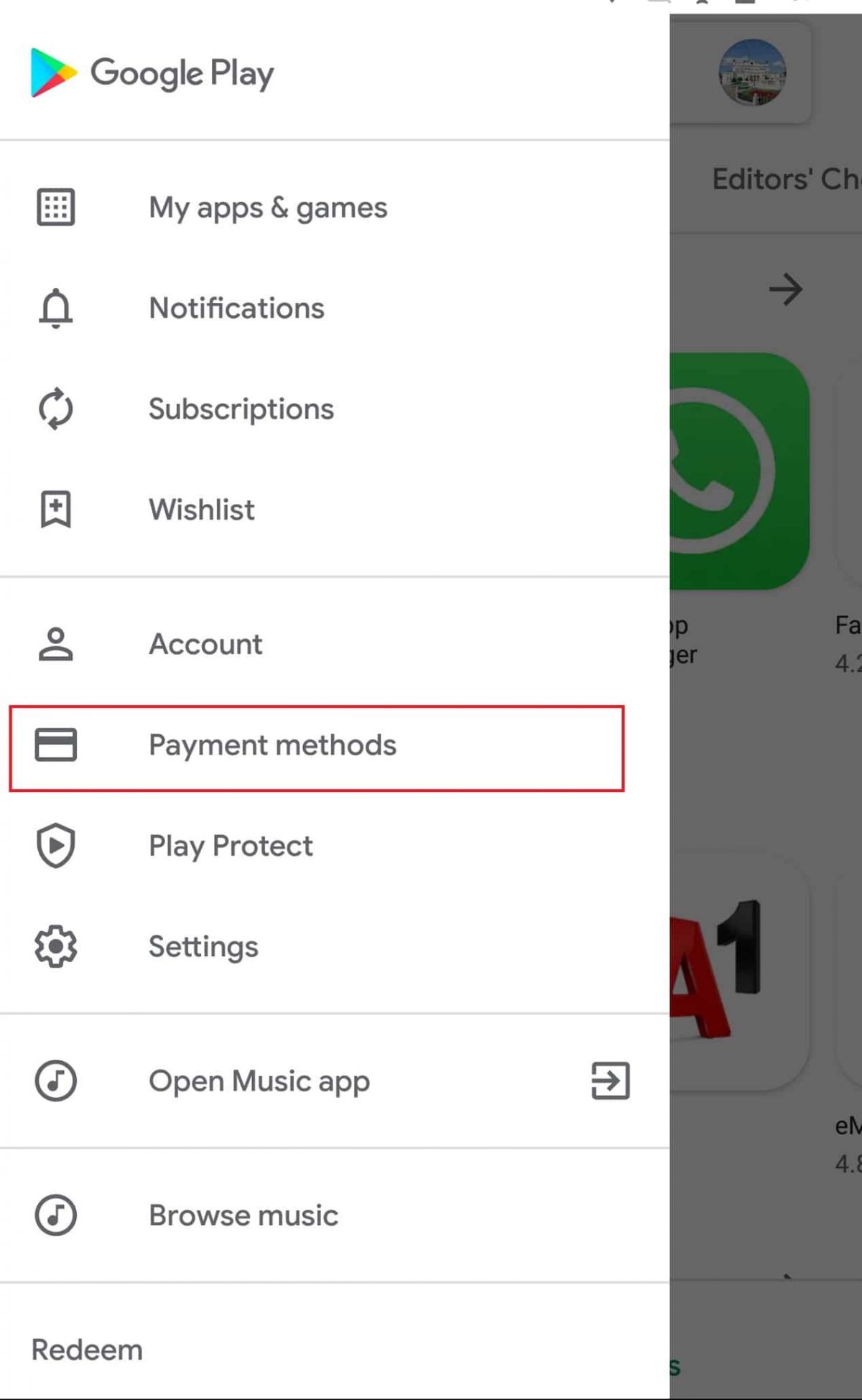
How to Make Purchases1. Open the application from the home screen of your device.2. You can search using the search bar or browse through categories.3. Tap the app or game you want to purchase.4. Tap the price button of corresponding app examples include “Buy” or “Install.”5. If prompted, select a payment method or add a new one.6. If prompted, follow any additional on-screen instructions to complete your purchase.Managing Payment Methods1. Open Play Store Settings by tapping your profile icon.2. Tap Payments & Subscriptions then select Payment Methods.3. Now you can add, remove, or update payment methods such as credit cards or PayPal to control how you pay.Removing Payment Methods in DetailTo remove a payment method from an account, follow these steps:1. Open the app.2. Tap your profile icon, located in the upper-right corner.3. Tap “Payments & Subscriptions,” then tap “Payment Methods.”4. Scroll down, and tap “More Payment Settings” that opens in a web browser5. Find the source of payment you wish to remove and tap “Remove.”

Alternatives of Play Store
4.8
Let’s take a closer look at some of the popular Play Store alternatives.1. Aptoide- A community-driven marketplace boasting millions of apps, without any geo-restriction.- Users can upload their own apps with relative ease, promoting diversity in available content.2. Amazon Appstore- Provides a wide array of applications with strong developer support.- Commonly known for integrations involving Amazon devices such as Kindle Fire.3. APKPure- The app addresses a wide, varied provision of APK files directly to users for self-installation.- Very helpful in apps that are not published in your region or have restrictions via Google policy.4. F-Droid- Exclusively features open-source applications.- Ideal for users who value privacy and transparency in software development.

Amazon’s Virtual Try-On
4.8
Steps to Using Virtual Try-On1. Open Amazon Shopping and go to any product that supports Virtual Try-On, such as shoes or sunglasses.2. Tap on the “Virtual Try-On” option available on the product page.3. If prompted, follow the prompts to enable camera access.4. Point your device’s camera either at yourself or at your feet according to the prompt.5. Tap on styles or colors to see them live on you.BenefitsClearly, it helps you make confident purchasing decisions through a real-time preview of how the fit and style will be, hence reducing the need for returns and exchanges.

Stake.com Overview
5
The game library at Stake.com exceeds 3,000 selections that incorporate slots along with table games and live dealer matches as well as proprietary first-party content from their internal developers. Crypto users prefer the site because it facilitates safe Bitcoin and Ethereum transactions while maintaining user privacy together with quick processing speeds. Users can trust Stake.com because its provably fair gaming technology utilizes cryptographic hashing tools to ensure complete fairness as well as transparency in all games.Users can access Stake.com whether through mobile or desktop devices directly because the website has a responsive design while customer support operates via live chat and email throughout 24 hours. The website supports responsible gambling through educational programs and enables players to voluntarily exclude themselves from gambling activities.Stake.com provides cryptocurrency-backed online betting options through its wide variety of gambling games to satisfy users who seek trustworthiness and fairness anywhere in the world. The crypto gambling industry finds Stake.com to be at the forefront due to its distinctive operational features together with its ongoing advancement.All the above is compiled from the official Stake.com website. HotAppBlog offers no services on this platform. This write-up is just for informational purposes. For detailed or specific questions, please visit the official Stake.com website directly.

Personalization with TouchTunes
4.9
That personal touch extends to its smart song recommendations and curated playlists that are constantly refreshed with new discoveries, all for you. Outside of your phone, the app connects you to more than 65,000 venues where Lightsync is being used: You can control what's playing remotely, check out the vibe before committing and skip the line with a Fast Pass feature that makes sure your favorite songs get heard quicker. You can earn song credits and boosts the more you play, so you'll continue receiving value throughout your personalized experience.

Delve into Carnival's Fun with the App
4.6
A strength of the app is its personal touch. Activities can be filtered by guest interest, and they range from family friendly activities such as Seuss at Sea™ story time and parades to high-energy options like ropes courses or SportSquare challenges. The app even makes all the practicalities easy for you, book dining, bookmark your favourite activities and get live updates. This marriage of planning and participation takes cruising to a new level that makes each day custom-fit to you.Perfect for both first-time cruisers and experienced travelers, the app puts the“fun'in your cruise”all while keeping you connected to the fun exactly where you are. Families can plan children’s activities at Camp Ocean, and couples can easily locate romantic venues or evening entertainment. And by seamlessly blending ease with innovation, the app serves as a blueprint for Carnival's quest to deliver an unbeatable onboard experience that simultaneously challenges technology and thinks differently about fun.

Reading Libby Books Anywhere and Anytime
4.8
All you need do to get started: Connect your library card (including digital cards from services like Zhejiang Library), search for eBooks or audiobooks and tap “Borrow” — no trips to the library and no waiting for physical copies. Most titles are available for instant download, so you can get to listening right away, whether you’re at home or on the go. Books on even popular picks are sometimes available immediately through special programs.Libby’s 14-day loan periods and automatic returns keep the focus on reading, not logistics. It also supports adjustable audiobook speeds and offline reading. Libby If you want a fixed start-and-stop time for your browsing of libraries, Libby puts the world’s largest book collections in your pocket and also on-demand.

Several Ways to Transfer for your Global Needs
4.9
Accessibility and security is another strong point for Remitly. The service enables payments to more than 170 countries and transactions in many currencies. For example, cash pickup recipients can retrieve funds at our trusted partners'locations across the globe, while bank deposits provide direct access to an account. And mobile wallet integrations make it even less of a hassle — use them to instantly transfer money for those time-sensitive expenses. And this variety is supported by strong security, with encryption and compliance with international financial standards reassuring users.This flexibility makes Remitly great for a wide variety of use cases—from sending money to relatives overseas to businesses paying international contractors. By putting people at the center of everything we do, Remitlycloses the gap that financial institutions and networks have left between millions who can send money anywhere in the world but struggle toreceiveit.

Plantum의 '화분 측정기'가 식물 관리를 최적화하는 방법
4.1
앱은 물주기 빈도, 식물의 빛 요구량, 사용해야 할 토양 종류 및 비료에 대한 제안을 제공합니다. 심지어 식물을 잊지 않도록 시기적절한 알림까지 보내줍니다. 노란 잎 관리부터 새 묘목 재배까지, Plantum의 유용한 조언을 따르면 식물 관리를 간단하게 만들어 주변 환경을 서서히 푸르르고 풍요로운 공간으로 가꿀 수 있습니다.뿐만 아니라, Plantum은 최첨단 이미지 매칭 기술을 통해 버섯, 나무, 꽃, 곤충 등 40,000종 이상의 자연물을 식별할 수도 있습니다.AI 기술을 통해, 이 앱은 병든 잎 사진으로부터 식물 질병을 진단하고 건강을 회복시키기 위한 해결책을 제안할 수 있습니다.정원인들을 더욱 돕기 위해, 물주기, 비료 주기, 실외로 내놓는 시기 등에 대한 맞춤형 알림 기능도 있습니다. 여기에 더해 내장된 '조도계' 및 '날씨 예보' 기능과 같은 특별 도구도 갖추고 있습니다. 이러한 모든 기능은 독창적일 뿐만 아니라 모든 수준의 정원사에게 실용적인 응용 가능성을 제공하며, 과학에 기반한 지도를 통해 식물의 더 나은 삶을 촉진하는 데 모두 기여합니다.